PSP9 = Paint Shop Pro 9
PSPPX3 = PaintShop Photo Pro X3 (version 13)
I recently moved from PSP9 to PSPPX3, so these are my notes on that transition.
New Features since PSP9:X3 - Organizer reworked, Multi-photo editing, Enhanced Express Lab, Smart Carver, Additional RAW support, Vibrancy, Object Extractor, On-image text editing, Photo Project Creator (photo books, collages, cards, slideshows, videos), Windows 7 compatibility
Note: Project Creator is a separate program. I also got Painter Photo Essentials 4 for free on the X3 DVD I bought locally. So there were three separate installations. At Corel website it says free KPT plugins with purchase, but as far as I know that is inaccurate information.

X2 - Express Lab, Graphite Workspace, HDR Photo Merge, Makeover Tools (Thinner, bright eyes), Visible Watermark, 30 new tubes and 30 new frames, Layer Styles
XI - Color Changer Tool, Depth of Field, Time Machine & Photo Looks, Skin Smoother
X - One click Red-Eye Removal, Makeover Tools (blemishes, whiten teeth, paint on tan), Object Removal Tool, Infrared Film Photo Effect, Organizer instead of Browser, Color Management changes?
New features links:
Corel PSPPX3Google pdf comparisonHigh Pass Sharpen is a new feature since PSP9, but I don't know what version that was added.
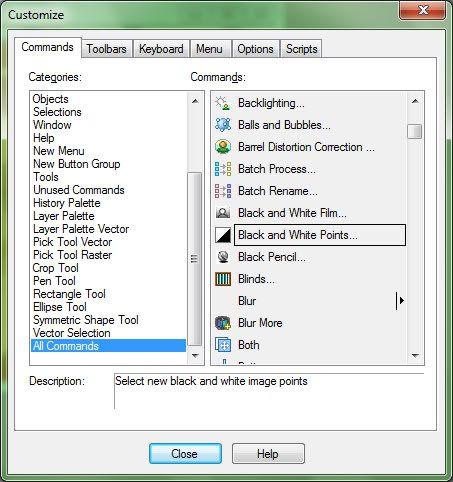
Customize Menus and Toolbars in X3:Right click on any Toolbar, Customize, Commands Tab, All Commands.
Will find previous versions items that were removed from X3 Menus and Toolbars.
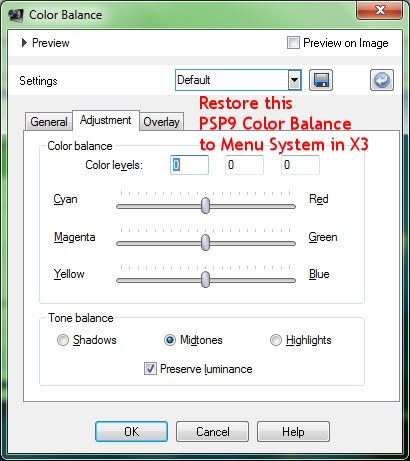
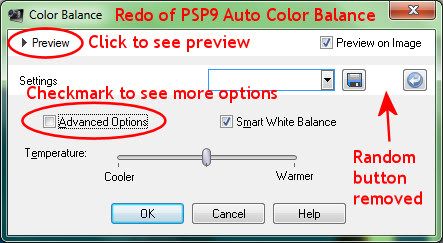
Some I've restored are Black and White Points, Grey World, Manual Color Correction, The old Color Balance under Adjust Menu. (The Color Balance in X3 looks like a redo of Auto Color Balance in PSP9 which I never used, but I'll have to try the one in X3.)
I reworked Menus and grouped more items together so the pull down lists would fit on my laptop screen.
I also reworked the Tools Toolbar quite a bit, adding items and rearranging them.
Then File, Workspace, Save.
View, Customize, Menu Tab, Reset to restore default menus.
Now if I could replace the icons on the Tools Toolbar with more readable ones I'd be really happy. In the same Customize area under the Options Tab there is a Large Icons option. I don't like them larger and taking up more space, though. I'd just like the small ones easier to read.
As mentioned previously, View Menu, and uncheck Use Graphite Workspace Theme helps readability tremendously.
Ctrl/Shift/V is paste as new image. Ctrl/V is paste as new layer.
View, Customize, Keyboard Tab to change that if desired.
Other observations so far:The Crop Tool behaves differently. It's always on and I have to clear it, which I dislike.
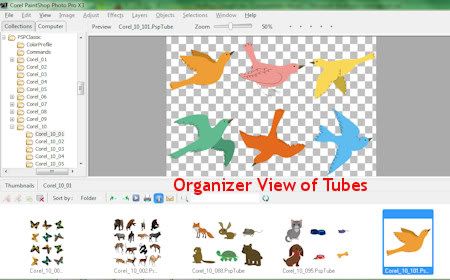
Tons of tubes. Some new frames.
To view those files in Organizer, change the preference settings:
File, Preferences, General Program Preferences, Organizer, Excluded Items, Uncataloged Folders
Delete:
C:\Program Files (x86)
Tubes location:
C:\Program Files(x86)\Corel\Corel PaintShop Photo Pro\X3\PSPClassic\Corel_10
Frames location:
C:\Program Files (x86)\Corel\Corel PaintShop Photo Pro\X3\PSPClassic\Corel_09
Patterns location:
C:\Program Files (x86)\Corel\Corel PaintShop Photo Pro\X3\PSPClassic\Corel_08
etc.
The advantage of viewing tubes within Organizer is that you can see all the tubes in a tube file at a glance. I don't think that is possible any place else.
Not much for brushes or presets, but I have all my previous versions goodies.
I think stuff can be dug up at the old Jasc site yet? There were tons of freebies available there at one time. I think the bonus packs are called respacks2 and 3 exe? They installed when I had PSP9 installed and ran them. I think animation shop can be found there, tubes, frames, tuts, presets, etc. Worth digging around in there.
ftp jasc.comI noticed Saturation was added to
Fill Flash. I haven't used that yet, but I'm thinking that's a good thing.
Clarify (PSP9) is called
Local Tone Mapping in X3. It might behave differently too, I haven't played with it much yet.
Discussion
here and
here.
I thought at first that a lot of the
previews were eliminated from the popup menu settings of version X3, but then I finally realized that I can click the word "preview" at top left and the previews drop down. Oh! Also look for "Advanced options" checkmark drop downs as well. Some of the Random buttons are gone. Not really needed on Color Balance, but I do miss Random on Colorize.
Plugins need
FM Patcher to work in Windows 7.
Use
Font Thing to view and open uninstalled fonts for use within Paint Shop Pro. Used to be able to do this just by clicking and opening a font (Win XP). But that doesn't work in Windows 7. Download the zip with no install utility. I think Windows 7 has problems with the install utility and won't install it if that zip is used.
Offline help:I couldn't find a *.chm help file in my Corel directories on my hard drive. There is a pdf help file on my hard drive (says version X2) and there are some available online (say version X3), all have the same filename.
Filename: Corel PaintShop Photo Pro.pdf
Google it.
PSP YouTube channel



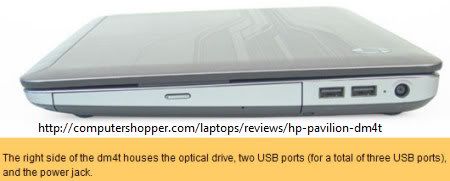
 HP Pavilion dm4-1065dx