Showing posts with label Firefox. Show all posts

Thursday, August 25, 2011

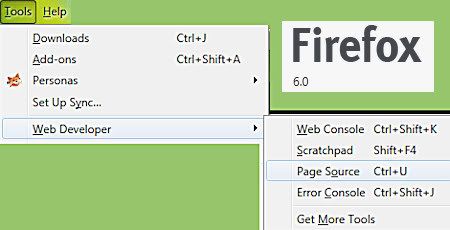
Firefox 6 - View Source Code


Menu Change:
View, Page Source
moved to
Tools, Web Developer
Ctrl/U still works.
View Page Source also shows up on the Right Click popup menu of web page.

Reference
(MozillaZine forum)

Tuesday, March 29, 2011

Firefox 4 - Where's The Padlock?


Website address should say https not http.
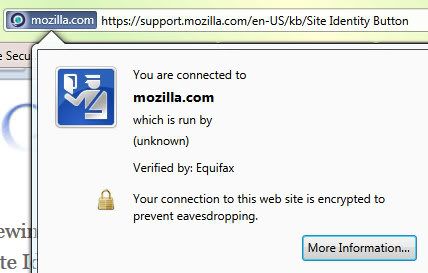
Click on favicon in address bar and you'll see the padlock if it's a "secure" or encrypted site.

Reference
"All the padlock means is that the web page is using HTTPS (Hyper-Text Transfer Protocol Secure). It's almost useless, since you can easily see if a website (such as this one) is using HTTPS by looking at the url bar, or checking if the web site's domain is extended into the favicon. If you really want it, the padlock is still there if you click on the favicon/domain button."

Site Identity Button
"If you are sending any sort of sensitive information (bank information, credit card data, Social Security Numbers, etc.) the Site Identity Button should not be gray."

Site Identity Button implemented in Firefox 3. Who knew.

Another thing I've noticed in Firefox 4:
Font rendering is not as good. I'm assuming it's Firefox 4 causing the problem since that's when I noticed it. I use Josefin Slab font on my blog titles and the slanted e does not display very clearly. Addon fix?

Firefox - Java Console


I think this has probably been a problem for a while but I just didn't see it until I started tweaking Firefox 4.
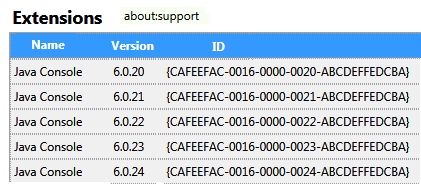
There are multiple Java Console addons listed when I go into Tools, Addons.
(These are not listed in Windows 7 Control Panel Programs.)
Within Firefox, I disabled all but the newest version.
Exited Firefox.
Then went to the Firefox Folders.
In Windows 7 the extensions are stored here:
C:\Program Files (x86)\Mozilla Firefox\extensions
I deleted the relevant extra Java Console folders except for the newest version.

Monday, March 28, 2011

Firefox 4 - Another Add-on


I noticed the Address Bar behavior changed. Wah.
Here's the addon to fix that.
Via GroovyPost.
(More tips there.)

Boy, seems like I'm adding more and more add-ons to this version of Firefox, hmmm.

Friday, March 25, 2011

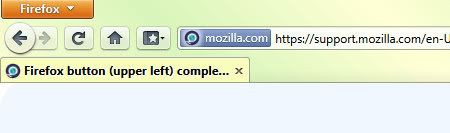
Firefox 4 Orange Button


Hey I want an orange button too!
View, Toolbars, Menu Bar, Uncheck will display the new Orange Button.
Or maybe not...Go back! lol
Click orange button, Options, Menu Bar, checkmark.

I noticed a lot of the how-to commentary on Firefox 4 uses the orange button and I didn't have one so I was curious.
The orange button might be handy if you could drag it where you want, but otherwise it just hogs extra screen real estate because you can't drag anything else up there beside it. I don't get it.
I put my Bookmarks Toolbar up there beside the Menu Bar to get a little extra screen real estate. With this wide screen laptop, I'm always trying to get as much vertical screen area as I can.
View, Toolbars, Bookmarks Toolbar, Uncheck will get rid of the extra space above Tabs if you move the Bookmarks Toolbar up beside the Menu Bar.

I think some have figured out how to move the orange button with userchrome.css tweak? (It says "move menu button and tabs to the same row".) I'll fiddle with that later. I haven't moved my Tabs to the top--yet. A quick move Tabs to top tells me I can move my Tabs beside Orange Button without a userchrome.css tweak, so that would maybe help save screen real estate, except for my Bookmarks Toolbar. I'm undecided about moving my Tabs there.

There is no Reload (Ctrl/R) in the Menu. Only the Reload icon, which can be moved if you right click on the toolbar, Customize and drag the icon where you want it. Not a huge biggie, but I use Ctrl/R instead of the icon and sometimes I can't remember the keyboard shortcut so I look in the Menu. I don't know why you wouldn't just leave it there where it was.

Thursday, March 24, 2011

Firefox 4


So let's make those inactive tabs as ugly and as hard to read as possible, shall we.
I just spent hours trying to change that.
The tab color automatically changes with Personas and not in a good way.

Out of desperation, I installed tab-mix plus add-on which is overkill and really should not be necessary. I noticed that I can now control where new tabs display, so I may find this add-on more useful.

change color of tab
"Use the Tab Mix Plus addon, and in Tools, Tab Mix Plus Options, click Display, click Tab and check the box that says Current tab. Now click Customize Styles and under Current Tab select how you want the current tab to be displayed (e.g. background colour of Red). Click OK and OK again."

I tried the old trick of editing userChrome.css to change tab colors, but the reference link is no longer valid and I couldn't get it to work so maybe it just doesn't work in Firefox 4.
(Working reference links: here and here.)

UserChrome location in Windows 7 is here:
C:\Users\UserName\AppData\Roaming\Mozilla\Firefox\Profiles\DefaultFolder\chrome

Had to get rid of that add new tab button again.
That worked. (Redundant feature.)

How do you bookmark all tabs in FF4?
Right click on a tab and select Bookmark all Tabs.

I tried using Tab Groups and ended up closing all my tabs. grrrrr It is not very clear how to get back to the normal browser window. I assumed it was like the usual popup window, you just close it to get back to normal browsing. NOT. Do not click on the x at top right of popup. Click the plus at bottom left. Resize at bottom right. Name Tab Group Top left. None of those have popup text explaining what they do.

What is up with the Status Bar and Add-on Bar?
I need NoScript icon displayed at all times so I can monitor it.
Right click Add-on Bar, Customize, get rid of Personas icon by dragging it off the Add-on Bar. (It is available in Customize to move elsewhere if desired.)
Drag the NoScript icon to the top and I can now get rid of the Add-on Bar.

Friday, February 11, 2011

Google Fonts Won't Display in Firefox - Fixed

At Blogger Buzz it says there are additional fonts to use, but Firefox was not displaying them correctly at Google Fonts.

I fired up IE8 and, yes, the fonts display correctly.

I check NoScript and AdBlock and Firefox About:Config...
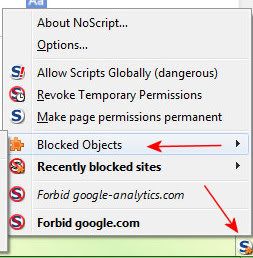
But wait...NoScript Icon has a little dot on it...
Blocked Object.


Aha! That's the problem.
However, I could not figure out what setting to change so it would be fixed permanently.

Via this site, Thank you.

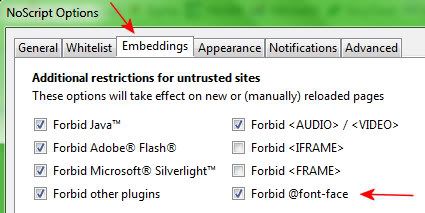
Here's the setting to uncheck:


Now I can play a little with fonts.
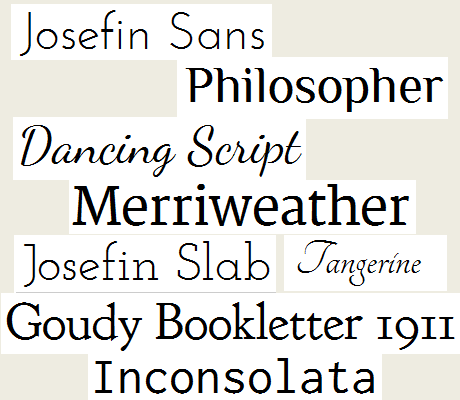
I like:

I'll have to figure out how to use them inline in my blog posts, if that's possible.
Probably have to tweak my template, I suppose.

Monday, September 13, 2010

Firefox Personas

Hey, I just got an update to the Firefox Personas plugin (version 1.6.1) and Customize Persona finally works.
Yay!
Now I can get busy creating some nice personas for myself and get rid of the ugly Win7 blues, in Firefox anyway. I wish I could do that in all my programs.


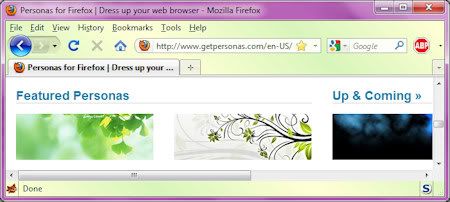
My Persona in the above screenshot is just a simple diagonal yellow and green gradient I used for testing purposes. Nothing fancy, but I like it. You can see my nice Windows 7 Purple window theme too.

Personas blogged previously here.

Monday, July 05, 2010

Firefox Personas

I was checking out the Firefox Personas.
Most of them compete with the browser UI too much and look awful on my screen.
I use a Bookmarks Toolbar and I need to be able to read that text.

I can preview, but can't use my own created images, unless I submit them to the public online gallery.
(Discussion of that here, here, and here.
This is supposed to be fixed with Firefox 3.6.7 version update.

I'll probably use Personas when the bug is fixed and I can just use my own without making them public.
It's much simpler to create them for my monitor and UI only.
My monitor is 1024x768, 17 inch.
The image sizes required for public use are much larger than what I need and only a small portion of the image is actually displayed on my screen.

How to Create Your Own Persona
"subtle, soft contrast images and gradients work best"

"highly detailed images will compete with the browser UI"

I think most people are ignoring that advice, LOL.

A person could use almost any image as long as the colors were faded with a white overlay layer on top at about 50% percent opacity.

File size limit is 300KB.
PNG or JPG file format.

Headers:
Header image size: 3000x200.
Header image displays from top right to left.
I only see the top right 1024x70 (Tabs) or 1024x94 of a 3000x200 image.
If I could make headers for my use only, I could just make them 1024x100.

Footers:
Footer image size: 3000x100.
Footer image displays from bottom left to right.
I only see the left bottom 1024x22 of a 3000x100 image.
When I used Edit, Find in Firefox my footer becomes about 50 pixels high.
So I'd need to make my footer about 1024x50.

I found one persona in the public gallery I really like and that's Nice Flower.

(Again, I only see the top right portion.)
Instead of using the plain green footer, I'd crop that "nice flower" header image and make a footer out of it.
Thursday, December 31, 2009

Cleaning Out Firefox Bookmarks

New year, time to clean out Firefox Bookmarks.
First, gotta backup, which is more complicated than it used to be.
Luckily, I wrote myself a little how-to map last year, so it went quickly this year.


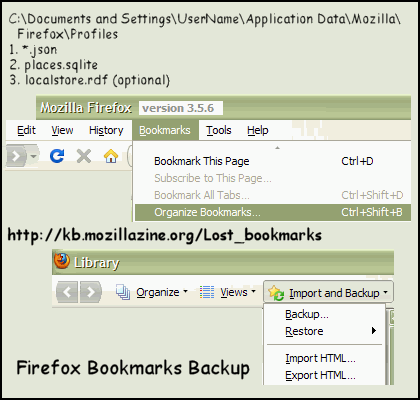
There are two files to backup.

1. C:\Documents and Settings\UserName\Application Data\Mozilla\Firefox\Profiles\
bookmarkbackups folder
Backup most recent *.jsonfile found there.
(Can Restore in Firefox: Bookmarks/Organize Bookmarks/Import and Backup/Restore)

2. C:\Documents and Settings\UserName\Application Data\Mozilla\Firefox\Profiles\
Back up the places.sqlite file, which is the current bookmarks file.
(Optional: backup the localstore.rdf file too.)

3. I also exported to html in the same menu area within Firefox.

That should cover it, in case I have to access/restore anything I delete.

Now I can start cleaning out my bookmarks.

Ref Link

Wednesday, December 16, 2009

That Pesky Firefox Problem

I thought I had solved this mystery, but alas, the problem still exists.

Now the session restore works when I use the X button exit (previous post).

BUT
IF
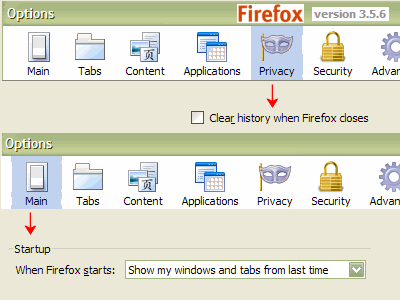
the option:
"clear recent history when Firefox closes"
is checked
The session restore will not work.


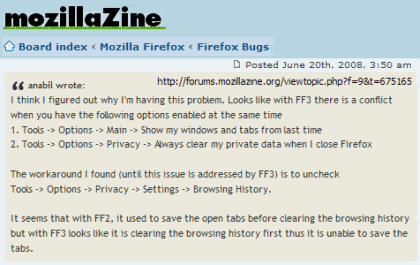
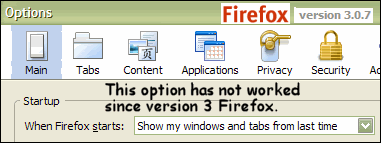
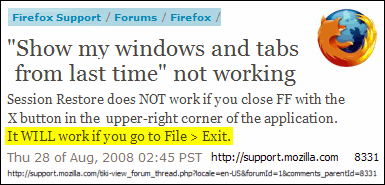
Show My Windows and Tabs from last time broken

So
I have two choices.


a) show my windows and tabs from last time
OR
b) clear history when firefox closes
Can't do both automatically, evidently.
Sigh.

Wednesday, August 19, 2009

Firefox 3.5.2


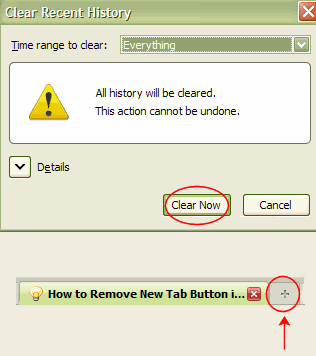
How can I make that clear recent history confirm go away in Firefox3.5.2?
I have to install an addon for that now.

Just a few of probably the many complaints about that one,
here
and
here.

How to Remove New Tab Button in Firefox 3.5.2.

C:\Documents and Settings\UserName\Application Data\Mozilla\Firefox\Profiles\profile.default\chrome

add below string to userChrome.css file
.tabs-newtab-button {display: none;}

Friday, March 27, 2009

Firefox Mystery Solved

Well, one Firefox mystery finally solved.


Firefox Link:
"Show my windows and tabs from last time" not working

My other wishes:

1. Save duplicate bookmarks with Ctrl/D.
2. Open tab next to current tab.
(Plugin does not work with version 3 Firefox.)

Tried Google Chrome.

Can't live without my Firefox NoScript and AdBlock.